Affordable Fitness Software • Designed for Small & Medium Gyms အသေးစားနှင့် အလတ်စား ဂျင်မ်များအတွက် ကုန်ကျစရိတ်သက်သာသော ဆော့ဖ်ဝဲ

Smart, Affordable Gym Management Software for Small & Medium Gyms ဘတ်ဂျက်အကန့်အသတ်ရှိသော အသေးစားနှင့် အလတ်စား ဂျင်မ်များအတွက် လက်တွေ့ကျပြီး ကုန်ကျစရိတ်သက်သာသော ဆော့ဖ်ဝဲ

Affordable web-based gym software for small and medium gyms in Myanmar. 1-sec QR check-in, KPay & WavePay slips, shop POS, and net profit reports without costly hardware.

စက်ပစ္စည်းအပိုဝယ်ရန်မလိုသော အသေးစားနှင့် အလတ်စား ဂျင်မ်သုံးဆော့ဖ်ဝဲ။ QR Check-in၊ KPay/WavePay စလစ်မှတ်တမ်းနှင့် နေ့စဉ်အမြတ်စာရင်းများကို စနစ်တကျ ထိန်းကျောင်းနိုင်ပါသည်။

Local First

Myanmar Kyat (MMK), Unicode fonts, 09xxxxxxxxx numbers. မြန်မာကျပ်ငွေ၊ ယူနီကုဒ်ဖောင့်နှင့် ပြည်တွင်းဖုန်းနံပါတ်စနစ်။

1-Sec Check-In

Instant QR scan, Grace Days support & tablet kiosk mode. ကင်မရာ QR စကန်၊ ရက်သက်ညှာခွင့်နှင့် Tablet Kiosk စနစ်။

KPay & Wave

Slip screenshot archiving & auto expiration calculations. ငွေလွှဲစလစ်ပုံ သိမ်းဆည်းခြင်းနှင့် သက်တမ်းတွက်ချက်မှု။

Shop & Passes

Drinks POS, Day Passes & drawer petty cash tagging. သောက်ရေသန့် POS၊ နေ့စဉ်လက်မှတ်နှင့် အသုံးစရိတ်မှတ်တမ်း။

PT & Payroll

1-tap session deduction & auto coach payroll calculation. PT အကြိမ်ရေနှုတ်ယူခြင်းနှင့် နည်းပြလစာ အလိုအလျောက်တွက်ချက်မှု။

Close & Telegram

Blind cash drawer close & automated nightly bot reports. မျက်စိမှိတ် နေ့စာရင်းပိတ်နှင့် Telegram အလိုအလျောက် အစီရင်ခံစာ။

Application Interface စနစ်၏ မျက်နှာပြင်ပြခန်း (Live Screenshots)

Interactive Web Dashboard & System Walkthrough

Explore actual high-resolution screenshots of all 10 core modules in our gym management system.

အားကစားရုံသုံး ဆော့ဖ်ဝဲ မျက်နှာပြင်နှင့် လုပ်ဆောင်ချက်များ

ဂျင်မ်စီမံခန့်ခွဲမှုစနစ်တွင် ပါဝင်သော အဓိက အစိတ်အပိုင်း ၁၀ ခု၏ လက်တွေ့ မျက်နှာပြင်များကို လေ့လာကြည့်ရှုနိုင်ပါသည်။

Main Dashboard & Real-Time Analytics - Myanmar Gym Management System
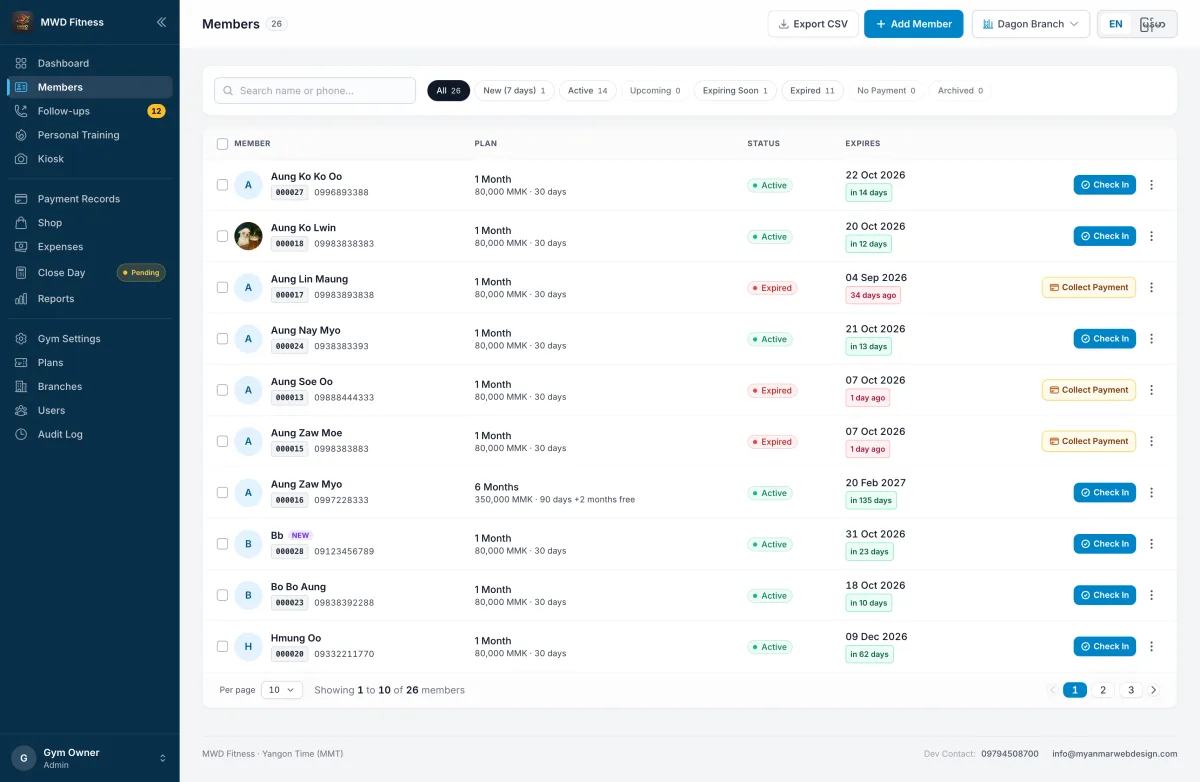
Member Profiles & Subscription Database - Myanmar Gym Management System
Reception & Self-Service Tablet Check-In - Myanmar Gym Management System
Counter Point of Sale (POS) & Inventory - Myanmar Gym Management System
Daily Expenses & Operating Costs - Myanmar Gym Management System
Financial Reports & True Net Profit - Myanmar Gym Management System
Audit Logs & Tamper-Proof Activity Trail - Myanmar Gym Management System
Membership Plans & Personal Training (PT) - Myanmar Gym Management System
Staff Management & Role-Based Access - Myanmar Gym Management System
Gym Branding & System Configuration - Myanmar Gym Management System
Executive Overview အုပ်ချုပ်မှု ခြုံငုံသုံးသပ်ချက် Main Dashboard & Real-Time Analytics ပင်မ ဒက်ရှ်ဘုတ်နှင့် စာရင်းချုပ် စီမံခန့်ခွဲမှု

Live gym metrics, active check-in counts, revenue summary, and operational alerts at a glance.

နေ့စဉ် ဝင်ရောက်လေ့ကျင့်သူများ၊ အသင်းဝင်စာရင်း၊ ဝင်ငွေနှင့် လုပ်ငန်းလည်ပတ်မှု အခြေအနေများကို တစ်နေရာတည်းတွင် ချက်ချင်းကြည့်ရှုနိုင်ခြင်း။

10 Core Operational Modules အဓိက အစိတ်အပိုင်း ၁၀ ခု Dedicated Tablet Kiosk Mode (/kiosk) တက်ဘလက် Check-In စနစ် (/kiosk) Zero Installation Required (Web HTTPS) Install ပြုလုပ်ရန်မလို (Browser မှ တိုက်ရိုက်သုံးနိုင်)
Operational Pillar 01 အဓိက အင်္ဂါရပ် ၁

Member Records & Accurate Subscription Tracking

အသင်းဝင် မှတ်တမ်းနှင့် သက်တမ်းစီမံခန့်ခွဲမှု

1
Complete Digital Files အချက်အလက် ပြည့်စုံစွာ မှတ်တမ်းတင်နိုင်ခြင်း Maintain accurate records for every member, including photo ID, unique membership code (GYM-000001), contact details, emergency phone number, and physical address. အသင်းဝင်၏ ဓာတ်ပုံ၊ အမည်၊ သီးသန့်အသင်းဝင်ကုဒ် (GYM-000001)၊ ဖုန်းနံပါတ်၊ နေရပ်လိပ်စာနှင့် အရေးပေါ်ဆက်သွယ်ရန် ဖုန်းနံပါတ်များကို စနစ်တကျ မှတ်တမ်းတင်ထားနိုင်ပါသည်။
2
Printable QR Member Cards & Smartphone Passes QR Code ပါဝင်သော အသင်းဝင်ကတ်များ Generate printable branded cards directly from the browser, or provide members with a digital QR pass to keep on their smartphones. စနစ်ထဲမှနေ၍ ဂျင်မ်လိုဂိုနှင့် အချက်အလက်များပါဝင်သည့် QR ကတ်ပြားများကို ပုံနှိပ်ထုတ်ပေးနိုင်သလို အသင်းဝင်၏ ဖုန်းထဲသို့လည်း ဒစ်ဂျစ်တယ်ပုံအဖြစ် ပေးပို့နိုင်ပါသည်။
3
Direct Renewal Workflow သက်တမ်းတိုးခြင်း (Renew) စနစ် Renew expired or expiring members in seconds; the system automatically sets the new start date based on previous subscription validity. သက်တမ်းကုန်ဆုံးသူများကို ခလုတ်တစ်ချက်နှိပ်ရုံဖြင့် မူလသက်တမ်းကုန်သည့်ရက်စွဲအတိုင်း အလိုအလျောက် ဆက်လက်တွက်ချက်ပေးပါသည်။

Active Validity Statuses အသင်းဝင် အခြေအနေ ခွဲခြားပြသမှု Visual Flags

ACTIVE (အသုံးပြုဆဲ) Good Standing

Valid subscription in good standing. Instant pass on check-in. အသင်းဝင်သက်တမ်း ကျန်ရှိနေသေးသူများ ဖြစ်ပြီး အခက်အခဲမရှိ ဝင်ရောက်လေ့ကျင့်နိုင်ပါသည်။

EXPIRING SOON (မကြာမီ ရက်စေ့မည်) ≤ 3 Days Left

Within 3 days of expiration, enabling timely staff reminders before lapse. ရက်စေ့ရန် ၃ ရက်သာ လိုတော့သည့်အတွက် ဝန်ထမ်းများအနေဖြင့် ကြိုတင်အကြောင်းကြား သက်တမ်းတိုးနိုင်ပါသည်။

EXPIRED (ရက်စေ့ပြီး) Renewal Required

Past subscription end date, clearly marked to prompt instant renewal upon arrival. သက်တမ်းကုန်ဆုံးသွားသူများအား ဂျင်မ်သို့ ရောက်ရှိလာချိန်တွင် ချက်ချင်းသိရှိပြီး အသစ်လဲလှယ်နိုင်ရန် အနီရောင်ဖြင့် ပြသပေးပါသည်။

Operational Pillar 02 အဓိက အင်္ဂါရပ် ၂

Front-Desk Reception & Self-Service Tablet Kiosk

Eliminate peak-hour reception bottlenecks with dual check-in channels.

ကောင်တာနှင့် တက်ဘလက် Check-In စနစ်

မနက်နှင့် ညနေ လူအများဆုံးလာရောက်ချိန်တွင် ကောင်တာ၌ လူစုပြုံတိုးခြင်း လုံးဝမဖြစ်စေပါ။

Staff Desk Mode

Receptionist Console
< 1 Second
1. Camera QR Scan ၁။ ကင်မရာဖြင့် QR စကန်ဖတ်ခြင်း

Point the member's card or phone at any standard webcam or tablet camera. The system reads the code and confirms the visit in less than one second. အသင်းဝင်၏ ကတ်ပြား သို့မဟုတ် ဖုန်းထဲရှိ QR Code ကို ကွန်ပျူတာ/တက်ဘလက် ကင်မရာတွင် ပြသရုံဖြင့် ၁ စက္ကန့်အတွင်း Check-in ပြုလုပ်နိုင်ပါသည်။

2. Instant Search ၂။ အမြန်ရှာဖွေခြင်း

Type a partial name, phone number, or 6-digit member code into the search field and confirm with a single click. အသင်းဝင်၏ အမည်၊ ဖုန်းနံပါတ် သို့မဟုတ် ကတ်နံပါတ် ၆ လုံးကို ရိုက်ထည့်၍ အတည်ပြုနိုင်ပါသည်။

Works with USB/Bluetooth barcode scanners natively.

Self-Service Kiosk

/kiosk
Member Autonomous
  • Touch-Optimized UI: မျက်နှာပြင်ကြီးမားခြင်း: Large high-contrast touch interface designed specifically for members to operate independently on iPad or Android tablets. ထိတွေ့အသုံးပြုရ လွယ်ကူစေရန် ခလုတ်ကြီးများဖြင့် ရေးဆွဲထားသော မျက်နှာပြင်။
  • Instant Verification: ချက်ချင်း စစ်ဆေးပြသခြင်း: Members enter their 6-digit code, phone number, or scan QR pass with immediate visual confirmation of remaining days. အသင်းဝင်ကတ်နံပါတ်၊ ဖုန်းနံပါတ် သို့မဟုတ် QR စကန်ဖြင့် Check-in ဝင်ရောက်ပြီး ကျန်ရှိသက်တမ်းရက်ကို ပြသပေးခြင်း။
  • Strict Duplicate Prevention: တစ်ရက်လျှင် တစ်ကြိမ်သာ ကန့်သတ်ခြင်း: Database-level duplicate check strictly restricts attendance to one recorded visit per member per day. အသင်းဝင်တစ်ဦးလျှင် တစ်ရက်အတွင်း တစ်ကြိမ်သာ Check-in ခွင့်ပြုရန် စနစ်မှ အလိုအလျောက် ထိန်းချုပ်ပေးထားပါသည်။
  • Auto Screen Clear: အလိုအလျောက် ရှင်းလင်းခြင်း: Resets screen in 4 seconds, immediately ready for the next member in line. စစ်ဆေးပြီးသည်နှင့် နောက်တစ်ဦးအတွက် မျက်နှာပြင် အလိုအလျောက် ပြန်လည်ရှင်းလင်းပေးခြင်း။
Full screen standalone PWA mode supported.

Check-In Grace Days (0–14 Days) ရက်စေ့သက်ညှာခွင့် (Grace Days)

Set a grace period in Gym Settings. Members whose plan expired within this window check in with an amber warning instead of an embarrassing block, giving front desk an opportunity to prompt renewal gracefully. Settings တွင် သက်ညှာရက် (၀ မှ ၁၄ ရက်) သတ်မှတ်ထားနိုင်ပါသည်။ သက်တမ်းကုန်ပြီးခါစ အသင်းဝင်များကို ချက်ချင်းတားမြစ်ခြင်းမပြုဘဲ ဝါကျင့်ကျင့် သတိပေးချက်ဖြင့် ဝင်ရောက်ခွင့်ပြုကာ ကောင်တာဝန်ထမ်းမှ သက်တမ်းတိုးရန် ညင်သာစွာ အသိပေးနိုင်ပါသည်။

Accidental Check-In Undo (Admin Privilege) မှားယွင်းစကန်ဖတ်မှု ပြန်ဖျက်နိုင်ခြင်း (Undo)

Scanned the wrong member in a rush? Admins can reverse an accidental check-in directly from the Recent Check-Ins list in seconds, restoring clean attendance records without clutter. လူမှား၍ စကန်ဖတ်မိပါက စီမံခန့်ခွဲသူ (Admin) အနေဖြင့် လတ်တလော Check-in စာရင်းထဲမှ ခလုတ်တစ်ချက်နှိပ်ရုံဖြင့် ချက်ချင်း ပြန်ဖျက် (Undo) ပေးနိုင်သဖြင့် တက်ရောက်မှုစာရင်း တိကျမှန်ကန်စေပါသည်။

Operational Pillar 03 အဓိက အင်္ဂါရပ် ၃

Audit-Proof Finances & Local Mobile Payment Slips

ငွေပေးချေမှုနှင့် ငွေလွှဲစလစ် မှတ်တမ်းများ

Supported Local Channels: Cash, KPay & WavePay ငွေပေးချေမှု ပုံစံများ: Cash, KPay နှင့် WavePay

Tailored specifically for Myanmar payment habits. Record cash or attach digital wallet transfer screenshots directly. ငွေသား (Cash)၊ KBZPay (KPay) နှင့် WavePay ငွေလွှဲပြေစာများကို စနစ်တကျ မှတ်တမ်းတင်နိုင်ပါသည်။

Screenshot Proof Archiving ငွေလွှဲစလစ် Screenshot သိမ်းဆည်းခြင်း

When members pay via KPay or Wave, staff attach the transfer screenshot directly to the transaction record. Both owner and management can inspect proof anytime. KPay သို့မဟုတ် WavePay ဖြင့် ပေးချေပါက အသင်းဝင်၏ ငွေလွှဲပြေစာ Screenshot ပုံကို ငွေပေးချေမှုမှတ်တမ်းနှင့်အတူ တွဲဖက်သိမ်းဆည်းထားနိုင်သဖြင့် စာရင်းစစ်ဆေးရာတွင် အထောက်အထား ခိုင်လုံစေပါသည်။

Automated Expiration Date Engine သက်တမ်းရက်စွဲ တိကျစွာ တွက်ချက်ခြင်း

Selecting a package automatically computes the exact validity date: start_date + duration_days - 1, eliminating manual calendar mistakes. အစီအစဉ် (Plan) ရွေးချယ်လိုက်သည်နှင့် သက်ဆိုင်ရာ ကျသင့်ငွေနှင့် ရက်စေ့မည့်ရက်စွဲ (start_date + duration_days - 1) ကို စနစ်မှ တိကျစွာ တွက်ချက်ပေးသဖြင့် မှားယွင်းမှု မရှိပါ။

Shareable Digital Receipt PNG Export

IRONPULSE FITNESS

Baho Road, Yangon • 09794508700

RECEIPT #REC-20260904-089

Member Name: Ko Kyaw Swar
Member ID: GYM-000215
Subscription: 1-Month Gold Fitness
Validity: 04 Sep 2026 – 03 Oct 2026
Payment Channel: KPay (Transfer)
TOTAL AMOUNT: Ks 65,000
✓ Viber Ready
✓ Telegram
✓ Messenger
Counter Point-of-Sale (POS) Stock Auto-Sync
Mineral Water (1 Liter)
Counter Drinks
1,200 MMK Stock: 48 units
Gold Whey Protein Shake
Supplements
6,500 MMK Low: 4 left!
IronPulse Gym Shaker Bottle
Merchandise
15,000 MMK Stock: 16 units
Multi-product cart with instant cash/KPay checkout 1-Click Print Receipt
Operational Pillar 04 အဓိက အင်္ဂါရပ် ၄

Integrated Counter Shop & Real-Time Stock Control

Gyms generate significant supplementary revenue from drinks and supplements. The built-in shop module manages counter sales and stock quantities directly without needing external retail software.

အချိုရည်နှင့် အားကစားပစ္စည်း အရောင်း/လက်ကျန်စာရင်း

ဂျင်မ်များအတွက် အပိုဝင်ငွေရရှိစေသော အချိုရည်နှင့် ဖြည့်စွက်စာအရောင်းကို သီးသန့် POS စနစ်ဖြင့် စီမံနိုင်ပါသည်။ ပြင်ပ POS ဆော့ဖ်ဝဲများ သီးသန့်သုံးစရာမလိုဘဲ စနစ်တစ်ခုတည်းမှ အရောင်းနှင့် လက်ကျန်ကို တိုက်ရိုက်ထိန်းချုပ်နိုင်ပါသည်။

Fast Counter Checkout အမြန်အရောင်းကောင်တာ

Multi-product cart for bottled water, energy drinks, protein shakes, and gym merchandise. ရေသန့်၊ အားဖြည့်အချိုရည်၊ ပရိုတင်းနှင့် အားကစားပစ္စည်းများကို ခြင်းတောင်းစနစ်ဖြင့် ချက်ချင်းရောင်းချနိုင်ခြင်း။

Stock Depletion Tracking လက်ကျန်စာရင်း အလိုအလျောက်နုတ်ယူခြင်း

Every sale automatically reduces on-hand quantities in real time. ပစ္စည်းရောင်းချလိုက်သည်နှင့် စနစ်ထဲရှိ လက်ကျန်စာရင်းမှ အလိုအလျောက် လျှော့ချပေးပါသည်။

Low-Stock Warnings လက်ကျန်နည်းပါးမှု သတိပေးချက်

Dashboard alerts notify staff when items fall below safe threshold quantities. ပစ္စည်းလက်ကျန် သတ်မှတ်အရေအတွက်အောက် လျော့နည်းပါက Dashboard တွင် သတိပေးချက် ပြသပေးပါသည်။

Restock History ပစ္စည်းအသစ် ဖြည့်သွင်းမှု မှတ်တမ်း

Document incoming shipments with logged audit trails and supplier records. ပစ္စည်းအသစ်များ ရောက်ရှိလာပါက အရေအတွက် ဖြည့်သွင်းမှုမှတ်တမ်းများကို စနစ်တကျ သိမ်းဆည်းပေးပါသည်။

Walk-In Day Passes (Untracked) နေ့စဉ် လာရောက်လေ့ကျင့်ခ (Day Pass)

Sell casual 1-day entry passes directly via counter POS without depleting inventory stock counts. ရက်အလိုက် လာကစားသူများအတွက် ပစ္စည်းလက်ကျန် (Stock) မလိုအပ်သော နေ့စဉ်လက်မှတ်များကို POS မှတစ်ဆင့် တိုက်ရိုက်ရောင်းချနိုင်ခြင်း။

Drawer Cash Expense Tag အံဆွဲထဲမှ အသုံးစရိတ် နှုတ်ယူမှတ်တမ်း

Tag petty cash paid directly from the counter drawer (ice, water bottles) so drawer reconciliation matches physical cash. ရေခဲဖိုး၊ သောက်ရေသန့်ဖိုးစသည့် အသေးသုံးစရိတ်များကို အံဆွဲငွေမှ နှုတ်ယူကြောင်း မှတ်သားနိုင်သဖြင့် ညနေငွေစာရင်းတိကျစွာ ကိုက်ညီစေခြင်း။

Operational Pillar 05 အဓိက အင်္ဂါရပ် ၅

Personal Training (PT) Packages & Automated Coach Payroll

Manage trainer sessions effortlessly. Deduct credits with a single tap and calculate monthly trainer commissions automatically.

Personal Training (PT) သင်တန်းများနှင့် နည်းပြလစာ စီမံခန့်ခွဲမှု

PT သင်တန်းကြေးနှင့် နည်းပြခရှင်းတမ်းများကို ခေါင်းခဲစရာမလိုဘဲ ကလစ်တစ်ချက်ဖြင့် သင်တန်းချိန်နုတ်ယူကာ လစဉ်လစာကို အလိုအလျောက် တွက်ချက်ပေးပါသည်။

PT Session Deduction 1 Tap

When a member arrives for training, front desk or the trainer searches their name and taps Log Session. Remaining sessions decrement instantly, and the trainer's ledger records the earned commission. သင်တန်းသား လာရောက်လေ့ကျင့်ချိန်တွင် ကောင်တာ သို့မဟုတ် နည်းပြမှ အမည်ရှာပြီး "လေ့ကျင့်ချိန်မှတ်မည်" ခလုတ်နှိပ်ရုံဖြင့် ကျန်ရှိအကြိမ်ရေမှ ချက်ချင်းနုတ်ယူပြီး နည်းပြ၏ရငွေစာရင်းထဲသို့ အလိုအလျောက် ပေါင်းထည့်ပေးပါသည်။

Monthly Trainer Payroll Auto-Computed

Set each trainer's per-session payout rate (e.g. 15,000 MMK / session). At month-end, view total completed sessions, total payout, and one-click mark as paid. နည်းပြတစ်ဦးချင်းစီအတွက် တစ်ကြိမ်လျှင်ရရှိမည့် နှုန်းထား (ဥပမာ - ၁၅,၀၀၀ ကျပ်/ချိန်) သတ်မှတ်ထားနိုင်ပြီး လကုန်တွင် သင်ကြားပြီးစီးသည့် သင်တန်းချိန်အရေအတွက်အလိုက် စုစုပေါင်းလစာကို စာရင်းချုပ်ပေးပါသည်။

Session Validity Limits ရက်အကန့်အသတ် သတ်မှတ်ခြင်း

PT packages enforce both session counts and validity days (e.g., 12 sessions valid for 45 days) to ensure steady revenue and client attendance. သင်တန်းချိန် အကြိမ်ရေအပြင် သက်တမ်းရက် (ဥပမာ - ၁၂ ကြိမ်ကို ၄၅ ရက်အတွင်း) သတ်မှတ်နိုင်သဖြင့် အသင်းဝင်များ ပုံမှန်လာရောက်စေပါသည်။

Rate Lock Guarantee နှုန်းထား အပြောင်းအလဲ မထိခိုက်စေခြင်း

Each session earns the trainer's rate at the exact time it was completed. Updating a trainer's rate never alters past payroll records. နည်းပြခနှုန်းထား ပြောင်းလဲသတ်မှတ်သော်လည်း ယခင်သင်ကြားခဲ့ပြီးသော လေ့ကျင့်ချိန်များ၏ စာရင်းကို မထိခိုက်ဘဲ သီးခြားထိန်းသိမ်းပေးခြင်း။

Reports & Net Profit Sync အသားတင်အမြတ်တွင် နှုတ်ယူတွက်ချက်ခြင်း

PT package sales flow directly into revenue reports, while trainer payroll is deducted automatically from your gym's net profit. PT ရောင်းရငွေကို ဝင်ငွေတွင် ထည့်သွင်းပြီး နည်းပြခကို အသုံးစရိတ်အဖြစ် အလိုအလျောက် နှုတ်ယူကာ အသားတင်အမြတ်ကို တိကျစွာ ပြသပေးပါသည်။

Audit-Proof Corrections မှားယွင်းမှု ပြင်ဆင်နိုင်ခြင်း (Admin)

Mistakenly logged sessions can be reversed by Admins from the package history, immediately returning the session credit to the member. လေ့ကျင့်ချိန် မှားယွင်းနှိပ်မိပါက စီမံခန့်ခွဲသူ (Admin) မှ ပြန်လည်ဖျက်ပေးနိုင်ပြီး အသင်းဝင်ထံသို့ လေ့ကျင့်ချိန် ပြန်လည်ရောက်ရှိစေပါသည်။

Operational Pillar 06 အဓိက အင်္ဂါရပ် ၆

Renewal Follow-ups Pipeline & Direct Viber/SMS Reminders

Never lose a member to accidental lapse. Your front desk's automated daily outreach list with one-tap messaging.

သက်တမ်းတိုး ပြန်လည်ဆက်သွယ်ရန် စာရင်းနှင့် Viber/SMS ပေးပို့ခြင်း

သက်တမ်းကုန်မည့် အသင်းဝင်များအား လက်လွတ်မဆုံးရှုံးစေရန် ကောင်တာဝန်ထမ်းများ နေ့စဉ် ဖုန်းခေါ်၊ Viber နှင့် SMS မက်ဆေ့ခ်ျ ပို့ဆောင်နိုင်သော လုပ်ငန်းလမ်းကြောင်း။

1-Tap Contact Channels တစ်ချက်နှိပ် ဆက်သွယ်နိုင်ခြင်း

Tap Call to dial directly, Viber to open chat, or SMS with polite reminder text pre-filled. ဖုန်းတိုက်ရိုက်ခေါ်ဆိုခြင်း၊ Viber စကားပြောခန်း ဖွင့်လှစ်ခြင်း သို့မဟုတ် သက်တမ်းတိုး သတိပေးစာပါဝင်ပြီးဖြစ်သော SMS အလွယ်တကူ ပို့ဆောင်နိုင်ခြင်း။

Smart Call Results & Hiding ရလဒ်မှတ်တမ်းနှင့် အလိုအလျောက် ဝှက်ပေးခြင်း

Record outcome: Will renew, Thinking about it, No answer, or Not coming back. Members marked "No answer" hide until tomorrow to prevent double-calls. အသင်းဝင်၏ တုံ့ပြန်မှုကို မှတ်တမ်းတင်နိုင်ပြီး "ဖုန်းမကိုင်" ဟု မှတ်သားထားသူများကို နောက်နေ့မှသာ ထပ်မံပြသပေးသဖြင့် တစ်ရက်တည်း ဖုန်းနှစ်ခါဆက်မိခြင်းမှ ကာကွယ်ပေးပါသည်။

Birthdays This Week Widget ယခုတစ်ပတ် မွေးနေ့ရှင်များ သတိပေးချက်

Dashboard automatically surfaces active members celebrating birthdays in the next 7 days, giving staff a warm reason to reach out and build loyalty. လာမည့် ၇ ရက်အတွင်း မွေးနေ့ကျရောက်မည့် အသင်းဝင်များကို Dashboard တွင် အလိုအလျောက် သတိပေးဖော်ပြပေးသဖြင့် မွေးနေ့ဆုတောင်း မက်ဆေ့ခ်ျပို့၍ ရင်းနှီးမှုတည်ဆောက်နိုင်ပါသည်။

Operational Pillar 07 အဓိက အင်္ဂါရပ် ၇

Anti-Theft Blind Cash Reconciliation & Nightly Telegram Bot Briefings

Eliminate cash drawer discrepancies with blind counting, and receive daily financial reports directly on Telegram without logging in.

မျက်စိမှိတ် ငွေရေတွက် နေ့စာရင်းပိတ်ခြင်းနှင့် Telegram အလိုအလျောက် အစီရင်ခံစာ

ကောင်တာငွေအံဆွဲ စာရင်းမှားယွင်းမှု မရှိစေရန် မျက်စိမှိတ်ငွေရေတွက်ရသော စနစ်နှင့် ပိုင်ရှင်ဖုန်းထံသို့ ညစဉ် Telegram မက်ဆေ့ခ်ျ ပို့ပေးသော စနစ်။

Rule 1: Staff Count Blind ဝန်ထမ်းများ မျက်စိမှိတ် ရေတွက်ရခြင်း

Front-desk staff do not see the expected cash balance before closing. They count the physical banknotes, enter counts in the note denomination helper (10,000s, 5,000s, 1,000s), and tap Close Day. Only then does the system reveal: Balanced, Short, or Over. ကောင်တာဝန်ထမ်းများသည် ငွေအံဆွဲထဲတွင် ရှိရမည့်ငွေပမာဏကို ကြိုတင်မမြင်ရပါ။ ရှိသမျှ ငွေစက္ကူများကို ရေတွက်၍ ဂဏန်းထည့်သွင်းပြီး "နေ့စာရင်းပိတ်မည်" ကို နှိပ်ပြီးမှသာ ငွေကိုက်သည်၊ ငွေလိုသည် သို့မဟုတ် ငွေပိုသည်ကို စနစ်မှ ထုတ်ဖော်ပြသပေးပါသည်။

Rule 2: Tamper-Proof One-Close Limit တစ်ရက်လျှင် တစ်ကြိမ်သာ ပိတ်နိုင်ခြင်း

A closed day cannot be edited by staff. If an entry needs correction, only an Admin has permission to Reopen Day, and this event is permanently flagged with an alert and logged in audit trails. နေ့စာရင်းပိတ်ပြီးပါက ပြန်လည်ပြင်ဆင်၍ မရပါ။ မှားယွင်းမှုရှိပါက စီမံခန့်ခွဲသူ (Admin) သာလျှင် နေ့စာရင်းပြန်ဖွင့်ခွင့် (Reopen Day) ရှိပြီး ထိုလုပ်ဆောင်ချက်ကို စာရင်းစစ်မှတ်တမ်းတွင် အပြီးတိုင် သိမ်းဆည်းထားပါသည်။

Telegram Nightly Briefing
21:00 MMT Auto-Send

📊 GYM DAILY CLOSE REPORT

• Status: BALANCED ✓ (Closed by Front Desk)

• Drawer Cash: 385,000 MMK counted

• Digital Wallets: KPay: 520,000 | Wave: 150,000 MMK

• Revenue: Plans: 850k | Shop: 125k | PT: 80k MMK

• Drawer Expenses: 15,000 MMK (Ice & Water)

• Check-ins Today: 48 members

• Retention: 4 expiring this week | 3 follow-ups pending

Set up in 5 minutes via @BotFather. Sends instantly when front desk closes the day, or at scheduled evening time if closing is pending. Telegram BotFather မှတစ်ဆင့် ၅ မိနစ်အတွင်း အလွယ်တကူ ချိတ်ဆက်နိုင်ပြီး ကောင်တာမှ နေ့စာရင်းပိတ်သည်နှင့် ပိုင်ရှင်ဖုန်းသို့ ချက်ချင်း သတင်းပို့ပေးပါသည်။

Operational Pillar 08 အဓိက အင်္ဂါရပ် ၈

Executive Performance & True Net Profit Reconciliation

Know your gym's exact financial position every single evening.

စာရင်းဇယားနှင့် အသားတင်အမြတ် စစ်ဆေးခြင်း

နေ့စဉ် အမှန်တကယ် ကျန်ရှိသော အသားတင်အမြတ်ငွေကို တစ်နေရာတည်းမှ စစ်ဆေးနိုင်ပါသည်။

FINANCIAL RECONCILIATION FORMULA
True Net Profit = ( Memberships + Shop Sales + PT Packages ) − Operating Expenses − Trainer Pay
အမှန်တကယ် အသားတင်အမြတ် = (အသင်းဝင်ကြေး + ဆိုင်အရောင်းရငွေ + PT သင်တန်းကြေး) − အထွေထွေကုန်ကျစရိတ်များ − နည်းပြခရှင်းတမ်း

Daily Live Metrics နေ့စဉ် အချက်အလက်များ

Today's check-in volume, active member count, upcoming expirations, and unrenewed members at a glance. ယနေ့ လာရောက်လေ့ကျင့်သူ ဦးရေ၊ လက်ရှိအသင်းဝင်ဦးရေ၊ မကြာမီ ရက်စေ့မည့်သူများနှင့် ရက်ကျော်လွန်နေသူများ စာရင်း။

Expense Categorization ကုန်ကျစရိတ် အမျိုးအစားခွဲခြားခြင်း

Track rent, utilities, trainer payroll deductions, equipment maintenance, and supplies with monthly category share breakdown. ဆိုင်ခန်းငှားရမ်းခ၊ လျှပ်စစ်မီတာခ၊ နည်းပြနှင့် ဝန်ထမ်းလစာရှင်းတမ်းများ၊ စက်ပြင်စရိတ်များကို လအလိုက် ကဏ္ဍခွဲခြား၍ ရာခိုင်နှုန်းဖြင့် ပြသပေးခြင်း။

Excel & CSV Export Excel/CSV စာရင်းထုတ်ယူခြင်း

Download comprehensive revenue, attendance, and member data with UTF-8 BOM encoding, ensuring Myanmar text displays cleanly in Microsoft Excel. ဝင်ငွေ၊ အသင်းဝင်စာရင်းနှင့် လာရောက်မှုမှတ်တမ်းများကို Microsoft Excel တွင် မြန်မာစာ ဖောင့်မပျက်ဘဲ ဖတ်ရှုနိုင်သော UTF-8 BOM စနစ်ဖြင့် Download ပြုလုပ်နိုင်ပါသည်။

Operational Pillar 09 အဓိက အင်္ဂါရပ် ၉

Role Permissions & Permanent Audit Trail

Keep complete oversight and prevent revenue leakage. Staff can perform daily operations, while sensitive financial overrides, drawer reopenings, and record deletions remain strictly restricted to owners.

ဝန်ထမ်းလုပ်ပိုင်ခွင့် ကန့်သတ်ချက်နှင့် စာရင်းစစ်မှတ်တမ်း

စာရင်းအင်း လေလွင့်မှုမရှိစေရန် လုပ်ပိုင်ခွင့်များကို အဆင့်အလိုက် ကန့်သတ်ထားပါသည်။ ဝန်ထမ်းများသည် နေ့စဉ်လုပ်ငန်းများကိုသာ လုပ်ဆောင်နိုင်ပြီး စာရင်းဖျက်ပစ်ခွင့်၊ ရက်စေ့ပြင်ဆင်ခွင့်နှင့် ငွေစာရင်းပြန်ဖွင့်ခွင့်များကို လုံးဝကန့်သတ်ထားပါသည်။

Permanent Audit Log စာရင်းစစ် မှတ်တမ်း (Audit Log)

Records every sign-in, member modification, payment update, and deletion with staff name, timestamp, and details. ဝန်ထမ်းတစ်ဦးချင်းစီ၏ ဝင်ရောက်မှု၊ စာရင်းသွင်းမှု၊ ပြင်ဆင်မှုတိုင်းကို မည်သူ၊ မည်သည့်အချိန်တွင် လုပ်ဆောင်ခဲ့သည်ကို အမြဲမှတ်တမ်းတင်ထားပါသည်။

Permission Action Owner / Admin Front-Desk Staff
Conduct QR & Name Check-Ins ✓ Allowed ✓ Allowed
Register New Members & Renew Plans ✓ Allowed ✓ Allowed
Process Shop POS Sales & Day Passes ✓ Allowed ✓ Allowed
Record Drawer Cash Expenses ✓ Allowed ✓ Allowed
Blind Cash Close Reconciliation ✓ Full Control & Reopen ✓ Once Daily (Blind Count)
Undo Accidental Check-Ins ✓ Allowed (Quick Undo) ✕ Restricted
Manage Membership & PT Packages ✓ Full Control ✕ Restricted
Create & Remove Staff Accounts ✓ Full Control ✕ Restricted
Record Deletion & Overrides ✓ Full Control ✕ Strictly Disabled
Full Financial Analytics & Net Profit ✓ Full Visibility ✕ Hidden
Operational Pillar 10 အဓိက အင်္ဂါရပ် ၁၀

Runs on Existing Hardware & Standard cPanel Hosting

No proprietary scanning hardware. No costly server lock-in. Instant Telegram notifications.

စက်ပစ္စည်း လိုအပ်ချက်နှင့် Hosting စနစ်

စျေးကြီးသော စက်ပစ္စည်းများ ဝယ်ယူရန်မလိုဘဲ သာမန် Hosting ဖြင့် အသုံးပြုနိုင်ပြီး Telegram Bot ဖြင့်လည်း ချိတ်ဆက်နိုင်ပါသည်။

Hardware Independence စက်ပစ္စည်း လွတ်လပ်မှု

Operates on existing office PCs, laptops, iPad/Android tablets, and phones. Camera QR scan functions natively via HTTPS. ရုံးသုံးကွန်ပျူတာ၊ Laptop၊ iPad၊ Android တက်ဘလက် သို့မဟုတ် ဖုန်းများဖြင့် Browser ခွင့်ပြုချက်ဖြင့် တိုက်ရိုက် အသုံးပြုနိုင်ပါသည်။

Modern Tech Stack ခေတ်မီ နည်းပညာ

Built on modern Laravel 11, Tailwind CSS, and Livewire 3. Fast, stable, and highly responsive. နောက်ဆုံးပေါ် Laravel 11, Tailwind CSS နှင့် Livewire 3 နည်းပညာများဖြင့် တည်ဆောက်ထားပါသည်။

PWA App Mode PWA (App ကဲ့သို့သုံးနိုင်ခြင်း)

Installable on tablet home screens as a Progressive Web App (PWA) for full-screen, standalone reception kiosk operations. တက်ဘလက်နှင့် ဖုန်းများတွင် သီးသန့် App တစ်ခုကဲ့သို့ Install ပြုလုပ်ကာ Fullscreen ဖြင့် အဆင်ပြေစွာ ဖွင့်လှစ်နိုင်ပါသည်။

Brand Palettes Brand အရောင် ပြောင်းလဲနိုင်ခြင်း

Upload gym logo and switch between curated brand palettes (Pine, Ocean, Sunset, Royal, Crimson) or custom HEX colors anytime. မိမိဂျင်မ်၏ လိုဂို ထည့်သွင်းနိုင်ပြီး စနစ်၏ Brand အရောင်ကိုလည်း မိမိနှစ်သက်ရာ အရောင်ဖြင့် အချိန်မရွေး ပြောင်းလဲနိုင်ပါသည်။

Operational Manual & Knowledge Hub လုပ်ငန်းဆောင်ရွက်မှု လက်စွဲစာအုပ်

Explore the Complete User Guide (EN / MM) စနစ်အသုံးပြုသူလက်စွဲ လမ်းညွှန် အပြည့်အစုံ ဖတ်ရှုပါ

Dive into all 18 chapters covering daily reception workflows, 1-sec QR scanning, cash drawer reconciliation formula, Telegram daily summaries, and personal training payroll. ကောင်တာဝန်ထမ်းနှင့် စီမံခန့်ခွဲသူများအတွက် အခန်းပေါင်း ၁၈ ခန်းပါဝင်သော လက်စွဲစာအုပ် ဖြစ်ပါသည်။ နေ့စဉ် တက်ရောက်မှုစစ်ဆေးခြင်း၊ ငွေစာရင်းပိတ်သိမ်းခြင်းနှင့် အသုံးစရိတ်များကို အသေးစိတ် လေ့လာနိုင်ပါသည်။

Got Questions? မေးလေ့ရှိသော မေးခွန်းများ

Frequently Asked Questions

မကြာခဏ မေးလေ့ရှိသော မေးခွန်းများ

Does the system require a constant, high-speed internet connection? စနစ်အသုံးပြုရန် အင်တာနက် အထူးကောင်းမွန်ရန် လိုအပ်ပါသလား။
The system is built as an ultra-lightweight web application. It runs smoothly even on standard mobile 4G/LTE or basic commercial broadband connections. မလိုအပ်ပါ။ ပေါ့ပါးသွက်လက်သော စနစ်ဖြစ်သည့်အတွက် သာမန် 4G မိုဘိုင်းဒေတာ သို့မဟုတ် ရုံးသုံး အင်တာနက်လိုင်းများဖြင့် အဆင်ပြေစွာ အသုံးပြုနိုင်ပါသည်။
Can we use our existing barcode scanner? လက်ရှိသုံးနေသော Barcode Scanner စက်များနှင့် တွဲသုံးနိုင်ပါသလား။
Yes. In addition to using standard laptop or tablet cameras for QR scanning, standard USB and Bluetooth barcode scanners work seamlessly with the search input. တွဲသုံးနိုင်ပါသည်။ ကင်မရာဖြင့် စကန်ဖတ်နိုင်သည့်အပြင် ဆိုင်သုံး USB / Bluetooth Barcode Scanner စက်များဖြင့်လည်း ရှာဖွေရေးဘားတွင် တိုက်ရိုက် စကန်ဖတ် အသုံးပြုနိုင်ပါသည်။
How does the Blind Cash Count work at Close Day? ညနေပိုင်း ငွေစာရင်းပိတ်သိမ်းခြင်း (Blind Cash Count) စနစ် မည်သို့အလုပ်လုပ်သလဲ။
Front-desk staff do not see the expected drawer cash balance while counting banknotes at the end of the day. They enter their physical count, and upon closing, the system evaluates whether the drawer is Balanced, Short, or Over. Only Admins can see the expected balance and reopen a closed day. ဝန်ထမ်းများသည် ငွေအံဆွဲထဲတွင် ရှိရမည့်ငွေပမာဏကို ကြိုတင်မမြင်တွေ့ရဘဲ လက်ထဲရှိငွေစက္ကူများကိုသာ ရေတွက်ရိုက်သွင်းရပါသည်။ စာရင်းပိတ်ပြီးမှသာ ငွေကိုက်/မကိုက် (Balanced / Short / Over) ကို စနစ်ကတွက်ချက်ပြသပေးပြီး ပိတ်ပြီးသားစာရင်းကို Admin သာ ပြန်ဖွင့်ခွင့်ရှိပါသည်။
Can the system track Personal Training (PT) packages and trainer pay? Personal Training (PT) သင်တန်းကြေးနှင့် နည်းပြလစာရှင်းတမ်းများ တွက်ချက်နိုင်ပါသလား။
Yes. You can create custom PT packages (e.g., 10 sessions, 60 days validity), sell them to members, and deduct sessions with a single tap when a member trains. The system automatically calculates monthly payroll for each trainer based on completed sessions and subtracts it from True Net Profit. တွက်ချက်နိုင်ပါသည်။ အကြိမ်ရေအလိုက် PT သင်တန်းအစီအစဉ်များ ပြုလုပ်နိုင်ပြီး ကစားသူလာရောက်ချိန်တွင် ခလုတ်တစ်ချက်နှိပ်ရုံဖြင့် အကြိမ်ရေနုတ်ယူနိုင်ပါသည်။ ပြီးစီးသော သင်တန်းချိန်များအလိုက် နည်းပြတစ်ဦးချင်းစီ၏ လစဉ်ရငွေကို အလိုအလျောက်တွက်ချက်ကာ အသားတင်အမြတ်မှ နုတ်ယူပေးပါသည်။
How does the owner receive the automated Telegram Daily Summary? ဂျင်မ်ပိုင်ရှင်ထံ Telegram သို့ ညစဉ် အစီရင်ခံစာ မည်သို့ပေးပို့သလဲ။
You can connect a Telegram bot in Gym Settings in under 5 minutes. Every evening or right after Close Day, the bot sends a complete briefing to the owner’s phone with total income, payment method breakdown (Cash, KPay, Wave), check-in counts, and cash drawer reconciliation. ဂျင်မ် Settings တွင် မိနစ်ပိုင်းအတွင်း Telegram Bot နှင့် ချိတ်ဆက်နိုင်ပါသည်။ ညစဉ် ငွေစာရင်းပိတ်ပြီးချိန်တိုင်း သို့မဟုတ် သတ်မှတ်ချိန်တိုင်းတွင် နေ့စဉ်ဝင်ငွေ၊ ငွေပေးချေမှုပုံစံအလိုက် စုစုပေါင်း (Cash, KPay, Wave) နှင့် ကစားသူဦးရေ အစီရင်ခံစာကို ပိုင်ရှင်၏ဖုန်းသို့ အလိုအလျောက် ပေးပို့ပေးပါသည်။
Can members check in if their plan expired yesterday? ရက်စေ့ပြီးခါစ အသင်းဝင်များကို ရက်သက်ညှာခွင့် (Grace Days) ပေးနိုင်ပါသလား။
Yes. You can configure Check-in Grace Days (0 to 14 days) in Gym Settings. During the grace period, members can check in without front-desk rejections, while the system gently prompts staff and members to renew. Once grace period expires, check-in is strictly blocked. ပေးနိုင်ပါသည်။ Settings တွင် ရက်သက်ညှာခွင့် (၀ မှ ၁၄ ရက်အထိ) သတ်မှတ်ထားနိုင်ပါသည်။ သက်ညှာရက်အတွင်း အသင်းဝင်များ ကစားခွင့်ရရှိနေမည်ဖြစ်ပြီး ဝန်ထမ်းများထံ သက်တမ်းတိုးရန် သတိပေးချက်ပြသပေးပါသည်။ သက်ညှာရက်ကျော်လွန်ပါက ဝင်ရောက်ခွင့်ကို အလိုအလျောက် တားမြစ်ပိတ်ပင်ပါမည်။
How are mistaken records handled? စာရင်းမှားယွင်းမှု ဖြစ်ပေါ်ပါက မည်သို့ ပြင်ဆင်နိုင်ပါသလဲ။
Staff cannot delete transaction records. If a mistake occurs, an Administrator can review the transaction, correct the details (which recomputes the expiration date automatically), or remove the record. All changes are logged in the audit trail. သာမန်ဝန်ထမ်းများအနေဖြင့် စာရင်းများကို ဖျက်ပစ်ခွင့်မရှိပါ။ မှားယွင်းမှုရှိပါက Admin အကောင့်ဖြင့် စစ်ဆေးပြင်ဆင်နိုင်ပြီး ပြင်ဆင်ခဲ့သည့် အချက်အလက်အားလုံးကို Audit Log တွင် အမြဲမှတ်တမ်းတင်ထားပါသည်။
Is our member data private and secure? အသင်းဝင် အချက်အလက်များ လုံခြုံမှု ရှိပါသလား။
Yes. The system is deployed to your own private hosting server and database. Your client lists, financial records, and phone numbers remain exclusively under your control. အပြည့်အဝ လုံခြုံမှုရှိပါသည်။ အချက်အလက်အားလုံးသည် မိမိကိုယ်ပိုင် Hosting ဆာဗာနှင့် Database ပေါ်တွင်သာ တိုက်ရိုက်သိမ်းဆည်းထားသဖြင့် အသင်းဝင်ဖုန်းနံပါတ်များနှင့် စာရင်းအင်းများ ပြင်ပသို့ ပေါက်ကြားမှု မရှိနိုင်ပါသည်။
Schedule Your Deployment စနစ်စတင်အသုံးပြုရန် ဆက်သွယ်ပါ

Ready to Streamline Your Fitness Center?

မိမိတို့၏ ဂျင်မ်ကို စနစ်တကျ စီမံခန့်ခွဲရန် အဆင်သင့်ဖြစ်ပြီလား

Contact our technical team to discuss your gym's workflow, schedule a live system walkthrough, or arrange rapid deployment across Yangon, Mandalay, and throughout Myanmar. မိမိတို့၏ ဂျင်မ်နှင့် အားကစားစင်တာများကို စနစ်တကျ စီမံခန့်ခွဲနိုင်ရန် ယခုပင် ဆက်သွယ် စုံစမ်းနိုင်ပါသည်။ ရန်ကုန်၊ မန္တလေးနှင့် မြန်မာနိုင်ငံတစ်ဝှမ်းလုံးတွင် တပ်ဆင်အသုံးပြုနိုင်ပါသည်။

info@myanmarwebdesign.com • Service Area: Yangon, Mandalay & Nationwide